Checking Oathwood…
MINECRAFT SURVIVAL • RPG • TOWNS • VOICE CHAT
Come home to Oathwood.
OATHWOOD LAUNCHER • v0.5.20
One click. Straight into Oathwood.
Get the official Oathwood Launcher for your computer. Sign in securely with Microsoft, and it prepares Minecraft Java Edition 26.1.2, Fabric and Simple Voice Chat before taking you straight to play.oathwood.ca. v0.5.20 uses the exact high-resolution Oathwood mascot artwork on the launcher home screen and inside the rotating loading ring.
LIVE FROM THE SERVER
🍃 Lately in Oathwood
Real Minecraft advancements earned by Oathwood players.
Loading recent Oathwood activity…
WELCOME TO OATHWOOD
A Minecraft world made to settle into.
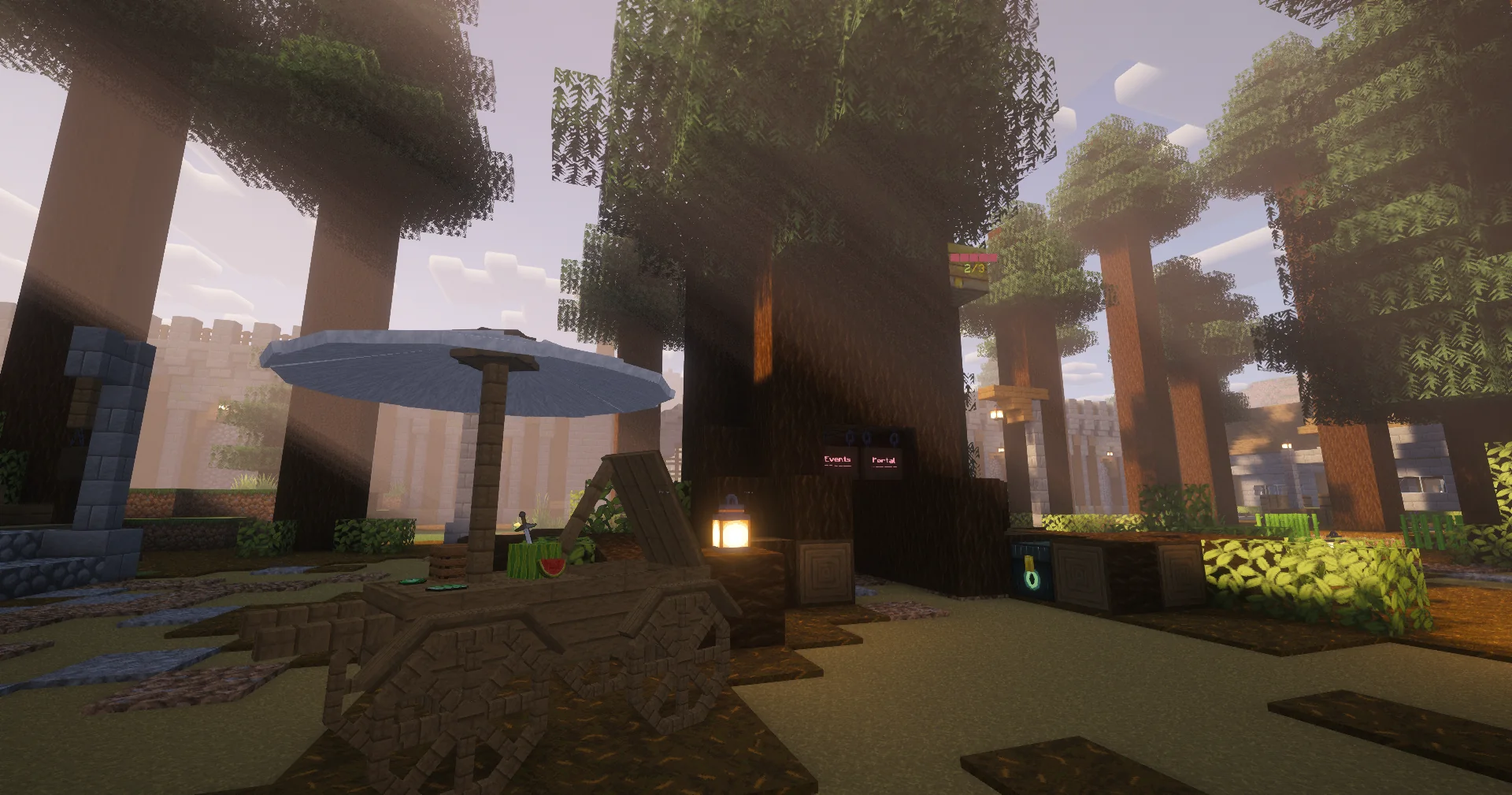
Settle into a town, rent or claim a home, run a shop, follow handmade quests, talk in proximity voice chat, and leave your mark on a world that keeps growing instead of resetting every few months.
🎮 Social RPG survival
🌲 Live world data
🏡 Homes & claims
📜 RPG quests
🗺️ Towns & roads
NO RUSH
Build something.
Build something.
TODAY
Wander somewhere.
Wander somewhere.
✦LIVE FROM OATHWOOD✦
THE SERVER IS TALKING TO THE SITE
What's happening right now.
See who’s playing, explore growing towns and catch up with the world you call home.
WHO'S ONLINE
Players Online
SETTLEMENT BOARD
Live Towns
● Live data refreshes quietly in the background.
LIVE FROM OATHWOOD
Hang out while Oathwood grows.
When Kaci is live on YouTube, the current stream appears here automatically. When the stream ends, this area becomes a shelf of recent Oathwood broadcasts.
Checking YouTube…Looking for the latest Oathwood stream.
FRESH AROUND OATHWOOD
See what players are settling into.
Explore homes advertised by My Oathwood residents, with real property photos and descriptions. Visit in game to buy or rent.
JUST LISTED
See all →Homes looking for somebody
SETTLEMENT SPOTLIGHT
See all →Towns worth wandering into
●Live discovery: this section updates itself from Oathwood Realty and the town registry — no duplicate property board to maintain.
THE WORLD IS BIGGER THAN THE WEBSITE
Take the long road.
LIFE HERE
Choose your own kind of day.
Quest if you want. Decorate if you want. Grind money, open a shop, build a town, go boss hunting, or spend the evening standing beside a campfire talking nonsense.
GUIDES & TUTORIALS
Learn the weird stuff once.
Tutorials for Oathwood's systems and the plugins built around them. Quick guides for the systems Oathwood actually uses.
PROXIMITY VOICE CHAT • JAVA
Hear Oathwood around you.
Oathwood uses Simple Voice Chat heavily. Java players can install the client mod to hear nearby players in 3D proximity chat, whisper, create groups, adjust individual volumes and use push-to-talk or voice activation.
SERVER VERSIONMinecraft 26.1.2
Your Simple Voice Chat client mod needs to follow Oathwood's Minecraft version. When Oathwood updates, update your client mod to the matching Minecraft version too.
Fabric
Our suggested client setup. Lightweight, straightforward, and the path we recommend for Oathwood.
NeoForge
Already play with NeoForge? Grab the matching client build.
Download 26.1.2 build ↗Forge
Forge users can use the matching 26.1.2 client release.
Download 26.1.2 build ↗Quilt
Quilt is supported too if that's already your loader.
Download 26.1.2 build ↗FABRIC SETUP
From vanilla Minecraft to voice chat.
Install Fabric Loader
Open the official Fabric installer, choose Minecraft 26.1.2, install the client profile, then launch that Fabric profile once.
Download Simple Voice Chat
Use the Fabric 26.1.2 button above. Put the downloaded .jar in your Minecraft mods folder. Do not put it in Oathwood's server plugins folder — this copy is for your client.
Launch Fabric & join Oathwood
Start Minecraft with the Fabric profile, join play.oathwood.ca, and look for the voice-chat icon. The server side is already set up.
Press V
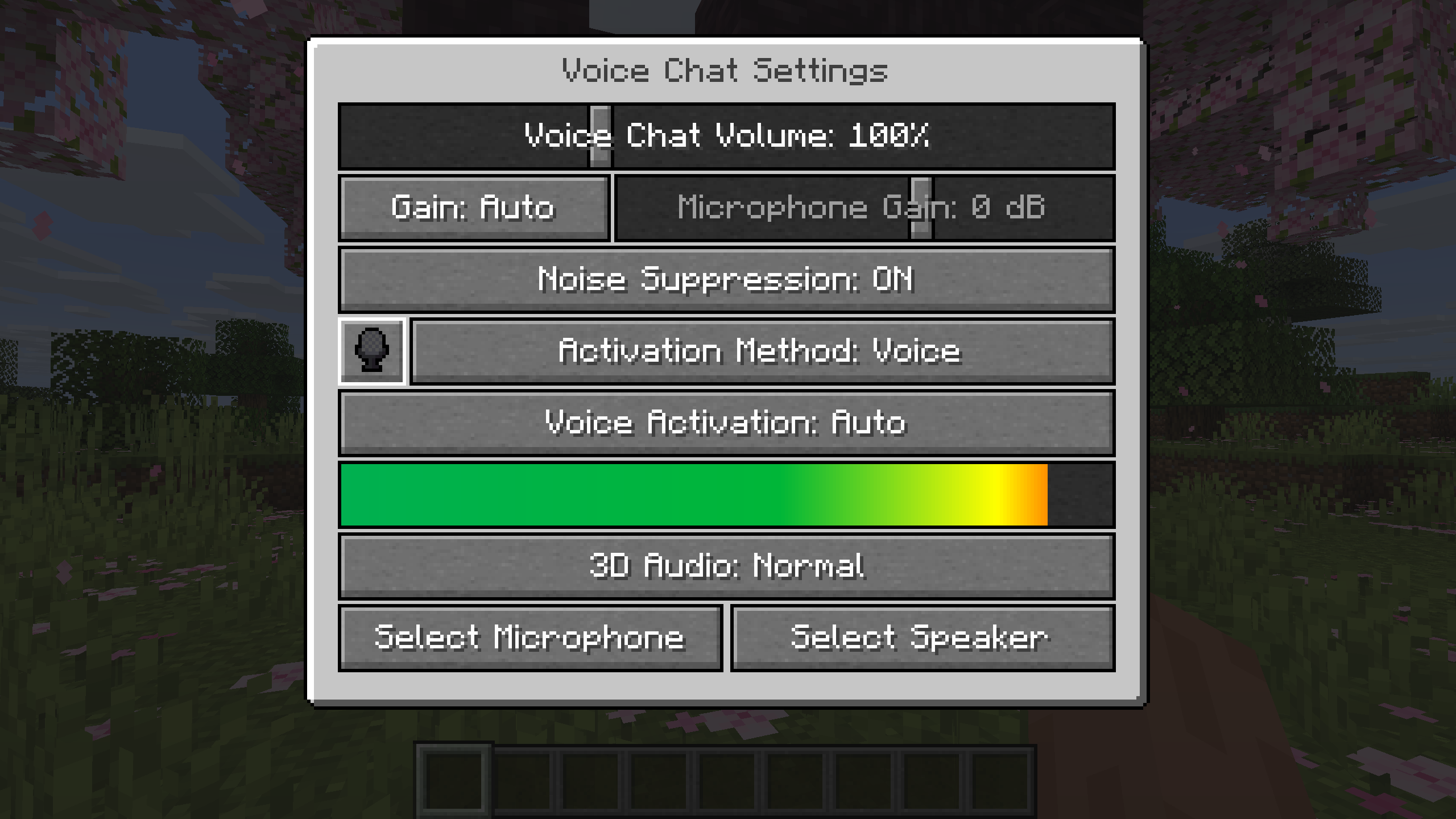
V opens the Simple Voice Chat menu. Pick your microphone and speaker, test your mic, choose push-to-talk or voice activation, and adjust volumes.
Nearby chat
Voice is positional: players get louder or quieter as you move around them.
Push to talk
Use your configured push-to-talk key, or switch to automatic voice activation in Settings.
Groups
Open the Group menu from the voice GUI to create or join a group that can talk beyond normal proximity.
Whisper & volume
Simple Voice Chat supports whispering and per-player volume controls when somebody is too loud or too quiet.
VIDEO GUIDE • CREDIT: ADRIENS / YOUTUBE
See Simple Voice Chat in action
A walkthrough covering installation, microphone setup, proximity chat and common connection issues.
Watch on YouTube ↗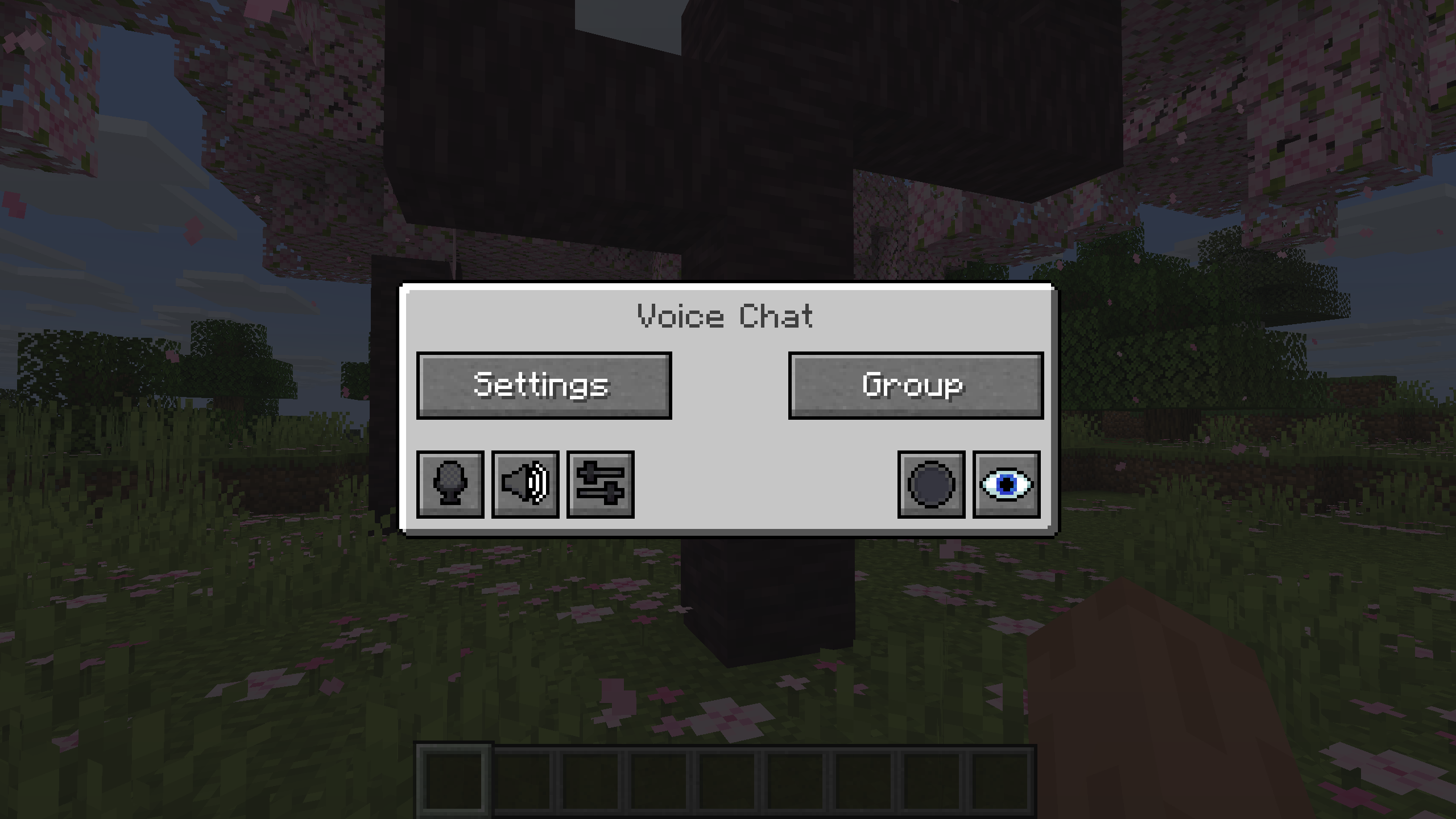
Simple Voice Chat is not an Oathwood mod.
Created by henkelmax and distributed through Modrinth. Oathwood is simply pointing players to the official project and matching client version. Official project ↗ · Official wiki ↗ · Fabric install guide ↗
THE PEOPLE BEHIND OATHWOOD
People of Oathwood
Scroll, swipe or use the arrows.
🌲 OATHWOOD UNDERGROUNDTHE WORKSHOP · DOWNLOADS
YOUR WORLD STARTS HERE_
Big server dreams.
First-server energy.
Meet Minecraft Starter Panel: a free, beginner-first way to set up and run your own Paper Minecraft server on Windows or Linux. Start with a spare computer and an idea. Learn the server stuff as you go.
Pick your download ↓Start on Windows.
Windows 11 · x64
v0.1.0-alpha21 · ZIP download
START-PANEL.bat.Give that spare PC a purpose.
Linux · x64
v0.1.0-alpha21 · ZIP download
Minecraft Starter Panel.desktop. Choose “Allow Launching” or “Trust and Launch” if prompted. See START-HERE.txt for a terminal fallback.Early alpha, ready to explore. These are development builds. Back up an existing server before experimenting. Choose from the Paper versions available in setup; the selected version needs compatible Java. This download manages a server on your computer—it does not include hosted server space.
WATCH & FOLLOW ALONG
Your video guide to the panel.
Want a reference while getting started? Watch our Minecraft Starter Panel walkthrough, then follow along with your download.
Watch on YouTube ↗FROM “WHERE DO I START?” TO “WHO’S JOINING?”
A whole toolbox. Room to learn.
The everyday controls up front, with the deeper tools there when you need them.
Your first server, step by step
Create a new Paper server or import an existing folder. Choose your version, pick a home for your server and follow the guided setup.
Java & memory, explained
Check Java compatibility, choose a sensible RAM allocation and change your Java path when needed. Supported Windows systems include a Java installation helper.
You’re in control
Start, stop and restart from the dashboard. Clear offline, starting and online states tell you when Minecraft is ready to join.
The real server console
Watch Minecraft’s output and send commands from your browser. See what the server is doing without keeping a separate terminal open.
Know how it’s running
See players, server RAM, system memory, CPU, TPS, MSPT, uptime and free disk space, with plain-English health information.
Make it yours
Change common server settings, memory and startup behaviour. Upload your Minecraft server-list icon and personalise the panel’s branding.
Files without the maze
Edit server configuration files inside the panel. The editor stays inside your server folder and keeps the previous copy before saving.
Keep your earlier backups
Existing manual backup archives remain accessible. Pro adds the recovery workspace, scheduled backups, retention and verification tools.
Help friends connect
Find your local join address and use the home-network scan and port-forwarding guide. Router hints and troubleshooting explain the next steps.
Learn as you go
Built-in lessons, a glossary, troubleshooting and a parents-and-guardians guide help make unfamiliar server terms understandable.
A fresh start when you need it
Forget a server without deleting its files, or deliberately delete a panel-created server and start again. Imported servers are protected from automatic deletion.
Runs on your computer
A small local app opens in your browser. No separate web server, Node or Python setup is required to run the panel; Minecraft still needs compatible Java.
PLUGINS, WITHOUT THE TAB HUNT
Find the right fit.
Install from the panel.
Open Plugins → Add Plugins to browse the built-in Modrinth catalog. Results are filtered to plugins whose authors declare support for Paper and your exact Minecraft version.
The panel downloads the newest stable compatible JAR into your plugins folder and verifies its provider hash. You can also upload a trusted JAR manually.
You can browse while Minecraft is running. Stop the server before installing, replacing, enabling, disabling or deleting plugins. Version matching helps; it cannot guarantee every plugin works with every other plugin.YOUR PAPER VERSION↓MATCHING MODRINTH PLUGINS↓CHOOSE · INSTALL · START
SAME PANEL. MORE POSSIBILITIES.
Your server, with Pro control.
Start free. When you upgrade, Pro transforms the panel you already use, with server health up front and deeper tools one click away.
PRO MONTHLYCAD $4.99per month · per panel installationOptional Pro upgrade
Start with Free
- Guided Paper setup on Windows or Linux
- Server start, stop, restart and live console
- Compatible plugin picker and manual JAR installation
- Common settings, branding and server file editing
- Connection guidance and built-in lessons
Go further with Pro
- Plugin updater: supported plugin update checks, automatic updates at scheduled restarts, exclusions and rollback
- Restart schedules: recurring restarts with in-game countdown warnings
- Pro backups: scheduled recovery backups, retention, verification and restore tools
- Pro dashboard: priority server health, memory, tick health and disk metrics, plus the resource timeline
- Custom broadcasts: configurable message buttons, previews, colours and repeat schedules
- Deeper server tools: configuration studio, worlds and profiles, player actions and companion controls
One download, one dashboard. Pro is an optional upgrade inside the same Windows/Linux panel. You do not need a separate Pro app. The free edition remains available to new and existing users.
Upgrade through PayPal. Pro costs CAD $4.99 every month, automatically renewed until cancelled. Open Pro Access → Subscribe with PayPal in the panel. A verified completed payment unlocks Pro and shows your access status; PayPal approval alone does not unlock it. The Oathwood donation button is separate from Pro subscriptions.
Required Pro companion. After activation, the panel prompts you to install its bundled Paper plugin. It supplies live server telemetry and in-game actions used by Pro. Follow the setup popup; a server restart may be needed to load the plugin.
Cancel renewal anytime. Pro continues through the verified paid period. When paid access ends, the panel returns to Free, preserves your server files and saved settings, and leaves Minecraft running. Pro automation pauses. Keep the panel running for schedules, and online for subscription checks; verified offline access is limited to six hours or the remaining paid period, whichever ends first.
Server hosting, cloud backup storage and a Minecraft account are not included. Plugin automation covers supported sources; compatibility between plugins is not guaranteed.YOUR FIRST SESSION
Four steps to your own world.
- Download & extract
Choose your operating system and extract the entire ZIP into a permanent folder.
- Open the panel
Use the included launcher. The management interface opens in your normal browser.
- Follow setup
Choose Paper, a server folder and memory settings. Follow the Java checks and setup prompts.
- Start & join
Press Start Server and wait for ONLINE. Use the join address shown by the panel.
A few things worth knowing.
Is the download free, and what does Pro cost?
Yes, the base panel is free to use. The current release is proprietary software. Optional Pro costs CAD $4.99/month per panel installation. You can use Free without subscribing.
How do existing users upgrade to alpha21?
Back up your server and panel data, then replace the panel executable in your existing installation. Keep your server folder and panel data directory, including any subscription link. Updating does not automatically subscribe you or charge you.
Do I need to know how to code?
No. Setup and common settings are guided, with explanations along the way. The console and file editor are available when you want to learn more.
Does it support every Minecraft version?
It is built for Paper servers, with version selection in setup. Available versions depend on the Paper builds offered there, and each requires the right Java version. It is not limited to Oathwood’s Minecraft version.
Can Bedrock players join?
The panel sets up a Minecraft Java Edition Paper server. Bedrock access needs additional compatible software such as Geyser/Floodgate; automatic Bedrock setup is not included in this release.
Can friends outside my house join?
Yes, with suitable network configuration. The panel guides you through port forwarding and common problems. Forward the Minecraft game port when needed, never the management panel’s port (8765 or its selected fallback port).
Does opening the panel start Minecraft?
Normally, no. The panel and Minecraft are separate processes. Press Start Server and wait for the green ONLINE state, unless you have explicitly enabled automatic server start.
What happens if I want to start over?
Forget Server resets the panel’s selection without deleting the server. Delete Server & Start Fresh is restricted to stopped, panel-created servers and requires a typed confirmation. It permanently removes that server folder and panel backups.
SUPPORT OATHWOOD
Help keep the lanterns on.
Donations help support hosting, custom development, quests, events and the continued growth of Oathwood SMP. Supporting the server is completely optional.
🌲 Server hosting & infrastructure
🛠️ Custom plugins & new systems
📜 Quests, events & future content
OATHWOOD SUPPORT
Donate with PayPal
Choose your donation through PayPal. Payments are processed in Canadian dollars.
Please enter your Minecraft username during checkout so Oathwood staff can match your donation to your in-game account.
POSTCARDS FROM THE SERVER
Built by hand. Lived in by players.
Real corners of Oathwood, not concept art. Tap any postcard to look closer.
THE DOOR'S OPEN
Come waste an evening with us.
No giant pitch. Join, walk around, meet somebody, find a road and see if the place sticks.